How to decompress ZIP?

What is ZIP?

ZIP is a popular data compression and archival format. A ZIP file contains one or more files that have been compressed, to reduce their file size, or stored as-is.

ZIP files generally use the file extensions ".zip" or ".ZIP" and the MIME media type application/zip. Some software uses the ZIP file format as a wrapper for a large number of small items in a specific structure. Generally when this is done a different file extension is used.

WinMount can mount, compress, decompress and browse ZIP. Here shows you 2 ways to decompress ZIP.

1. Using browser mode

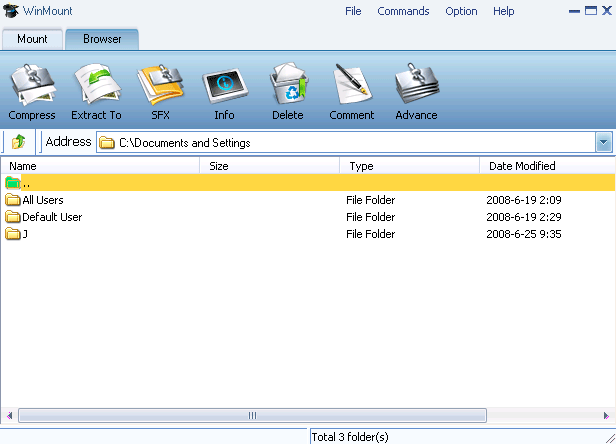
1) Select "Option -> Browser" on the WinMount main Menu;

select browser view

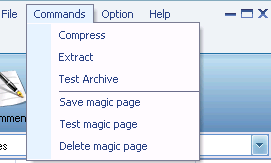
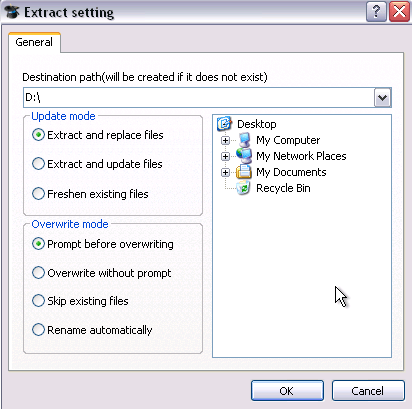
2) Select a ZIP archive, click "Extract" on the toolbar.

click "extract" to decompress

2. Using right-click menu

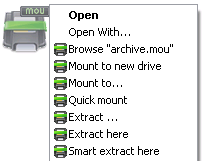
Right-click a ZIP archive, choose "WinMount3 -> extract".

Extract ZIP

. Extract to... : Extract to a selected directory.
. Extract here: Extract file to the current path.
. Extract to "Filename\": Extract file to a folder named "Filename" in the current path.
. Smart extract here: Extract file to a folder If there are several files inside. Extract file to current path if there is only a single file inside.

FAQ:

1. How to decompress RAR?
2. How to decompress ZIP?
3. How to decompress 7Z?
4. How to decompress WIM?
5. How to decompress ISO?
6. How to decompress MOU?

Home | Affiliate | Link to us | Links | Awards | Bug report


© Copyright 2007-2010 WinMount International Inc. All Rights Reserved

Email:support@winmount.com