How to decompress RAR?

What is RAR?

RAR is a patented archive file format that supports data compression, error recovery, and file spanning. RAR archives are able to handle efficiently split volumes. Before the advent of RAR the most notable such format was ARJ. It can be of a solid format, in which all of the compressed files are treated as a single data block.

The filename extension used by RAR is .rar for the data volume set and .rev for the recovery volume set. In previous versions, if a RAR-archive was broken into many smaller files (a "multi-volume archive"), then the smaller files used the extensions .rar, .r00, .r01, .r02 etc.It can be of a solid format, in which all of the compressed files are treated as a single data block.

WinMount can mount, decompress and browse RAR. Here shows you 2 ways to decompress RAR.

1. Using browser mode

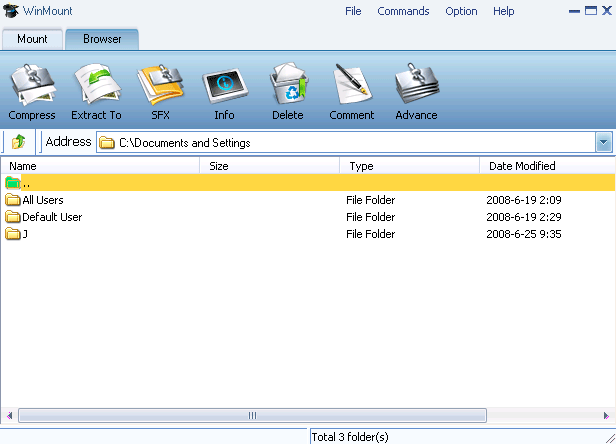
1) Select "Option -> Browser" on the WinMount main Menu;

select browser view

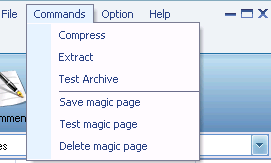
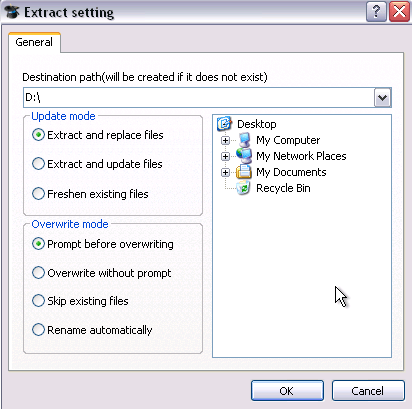
2) Select a RAR archive, click "Extract" on the toolbar.

click "extract" to decompress

2. Using right-click menu

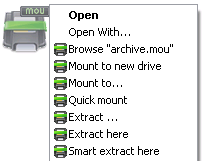
Right-click a RAR archive, choose "WinMount3 -> extract".

Extract RAR

. Extract to... : Extract to a selected directory.
. Extract here: Extract file to the current path.
. Extract to "Filename\": Extract file to a folder named "Filename" in the current path.
. Smart extract here: Extract file to a folder If there are several files inside. Extract file to current path if there is only a single file inside.

FAQ:

1. How to decompress RAR?
2. How to decompress ZIP?
3. How to decompress 7Z?
4. How to decompress WIM?
5. How to decompress ISO?
6. How to decompress MOU?

Home | Affiliate | Link to us | Links | Awards | Bug report


© Copyright 2007-2010 WinMount International Inc. All Rights Reserved

Email:support@winmount.com