

Basic
Compress
Mount
Advanced


If you have ordered WinMount online, you can register it according to following steps.
(Please make sure you are loging as administrator. )
For Vista user: Add this step, Right click on the shortcut icon for WinMount on your desktop and then
select "run as administrator" from the drop down menu. other user can skip this step.
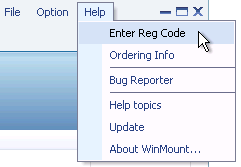
1. Click "Help -> Enter Reg Code" on WinMount main menu;
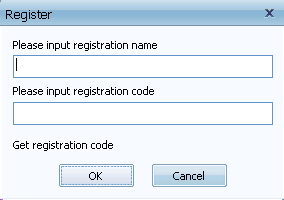
2. Pop-up the "Register" dialog, input your registarion name and registration code, click "ok";
3. Restart WinMount, all limitation are removed.